

♥ Wishlist
Compare 64 verified Smart Glasses products in Australia. Reviews, ratings, pros, cons and buying advice updated for October 2026.


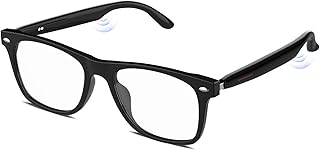


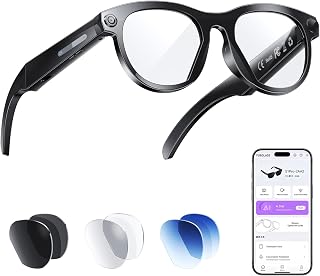


Smart glasses have moved beyond simple Bluetooth audio accessories. Depending on the model, a pair can combine open-ear speakers, microphones, cameras, voice assistants, hands-free calling, navigation-related assistance, photography, video capture, translation, and smartphone controls in a conventional eyewear format.
For Australian buyers, however, the most useful smart glasses are not necessarily the models with the longest feature list. The better choice depends on whether you want discreet everyday audio, AI assistance, hands-free photography, sports functionality, prescription compatibility, or glasses with an actual visual display. These categories can look similar in product listings while delivering very different experiences.
Before comparing individual products, identify which type of smart glasses you actually need. This is one of the easiest ways to avoid paying for technology that does not match your intended use.
Models such as Ray-Ban Meta and Oakley Meta combine conventional eyewear with cameras, microphones, open-ear speakers and an AI assistant. They are particularly suited to people who want to take photos or videos from a first-person viewpoint, listen to audio without wearing earbuds, make calls, interact with an assistant and perform selected tasks without reaching for a phone.
These glasses generally do not place a full digital image in front of your eyes. That distinction matters. If your primary requirement is augmented-reality navigation, floating screens, gaming or a virtual monitor, you should investigate display-based glasses instead.
Display glasses use miniature optical systems to project information or a virtual screen into your field of view. Products in this category can be useful for gaming, watching content, working with a laptop or phone, and creating a large virtual display without carrying a conventional monitor.
They are often a better fit for entertainment and screen-extension use than camera-and-AI glasses. They can also have different requirements for compatible devices, adapters, cables, power sources and software.
Sports-focused models place greater emphasis on secure fit, lens performance, durability, sweat and weather resistance, open-ear audio and hands-free interaction. Oakley Meta products are an important example of this direction, with the HSTN range aimed at combining everyday eyewear with AI, audio and camera functions while Oakley's performance-oriented designs target more active use.
For Australian outdoor use, pay particular attention to lens type, UV protection, glare control, frame stability, water resistance and how the device behaves during extended exposure to heat and direct sunlight.
A higher megapixel figure does not automatically mean better real-world footage. When comparing camera smart glasses, consider the complete imaging system.
A camera positioned on the frame can produce a useful first-person perspective because it follows your natural line of sight. It can be particularly convenient for travel, cycling, walking, family activities and situations where holding a phone would be awkward.
Smart glasses with integrated speakers are designed to keep your ears uncovered. That can be more convenient than earbuds when you need to remain aware of surrounding sounds.
When comparing audio performance, look beyond claims such as "immersive" or "premium." Check the speaker configuration, microphone array, directional audio design, maximum volume, voice-call performance and how effectively the system controls sound leakage.
Battery specifications should never be considered in isolation. Continuous audio, frequent camera use, AI queries, phone calls, wireless connectivity and environmental temperature can all influence actual runtime.
Ray-Ban Meta Gen 2, for example, is listed by Ray-Ban with up to eight hours of use under specified conditions, while the previous Ray-Ban Meta generation has a substantially shorter stated runtime. Oakley Meta HSTN is also listed with an eight-hour rechargeable battery under the manufacturer's stated conditions. These figures should be treated as manufacturer claims rather than a guarantee of the runtime every Australian buyer will experience.
The charging case is equally important. A pair that provides several additional charges from its case can be considerably more practical for travel than a model whose frame battery must be recharged frequently.
Check whether the case is compact enough for the way you normally carry glasses. Also investigate how the case itself charges and whether a charging cable is included.
Smart glasses are rarely completely independent devices. Many rely on a companion app and a compatible Android or iPhone for setup, configuration, content transfer, notifications, internet access and some AI functions.
Before purchasing, verify the minimum operating-system requirements for your exact model rather than assuming that any recent smartphone will work. Also check whether the features you care about are available in Australia, because AI functions, voice commands and other services can vary by country, language, account configuration and software version.
AI is one of the biggest differences between modern smart glasses and earlier connected eyewear. Depending on the product and market, an assistant may answer questions, interpret what the camera sees, provide contextual information, assist with messages, control media or perform other voice-driven tasks.
However, buyers should distinguish between hardware capability and software availability. A manufacturer can build hardware capable of supporting a particular function while restricting that feature to selected countries or languages. Software updates can also change the capabilities of a product after purchase.
For Australian buyers, check the Australian version of the manufacturer's documentation before relying on a particular AI feature. Do not assume that a feature demonstrated in an overseas advertisement will necessarily be available on an Australian account.
Ray-Ban Meta and Oakley Meta represent two closely related approaches to connected eyewear, but their design priorities are different.
Ray-Ban Meta is primarily positioned as everyday eyewear with integrated technology. The range includes familiar fashion-oriented silhouettes and can be attractive to buyers who want smart functionality without making the glasses look overtly like an electronic device.
Ray-Ban's Australian product information for the Gen 2 range lists a 12-megapixel camera, open-ear speakers, a five-microphone array, Wi-Fi 6E, Bluetooth 5.3, 32GB storage and an advertised battery life of up to eight hours under specified conditions. The range also supports prescription-lens options on applicable models.
That combination makes Ray-Ban Meta particularly relevant for commuters, travellers, content creators, everyday users and prescription-wearers who want smart features integrated into familiar eyewear.
Oakley Meta HSTN takes a more sport-oriented design direction while retaining the same broad concept of camera, AI and open-ear audio functionality.
Australian Oakley specifications list a 12-megapixel camera, custom five-microphone array, two open-ear speakers, Bluetooth 5.3, Wi-Fi 6E, 32GB flash storage and an advertised eight-hour rechargeable battery. Lens options include standard, Prizm, Prizm Polarized and Transitions variants depending on the configuration.
The HSTN can therefore be particularly interesting for buyers who place more emphasis on outdoor eyewear, lens technology and a sportier frame aesthetic.
Ray-Ban and Oakley belong to the same wider smart-glasses ecosystem in these product families, but the best choice can still vary significantly according to frame fit, lens configuration, intended activity and personal style.
Clear lenses are appropriate when the primary requirement is indoor use or ordinary everyday eyewear. They can also make sense when you already have separate prescription or prescription sunglasses for outdoor conditions.
Polarised lenses can be valuable in Australia because they reduce reflected glare from surfaces such as water, roads and other bright environments. They are especially relevant to driving, fishing, boating, beach use and outdoor recreation.
One consideration is that polarisation can affect how some LCD screens appear. If you frequently use a phone, dashboard display or other screen while wearing the glasses, test the combination where possible.
Transitions lenses are designed to adapt their tint according to lighting conditions. They can be convenient for people who move repeatedly between indoor and outdoor environments.
They should not automatically be treated as a replacement for every type of dedicated sunglasses. The exact lens behaviour depends on the product and conditions, and buyers should consider the amount of sunlight, time spent outdoors and whether strong glare control is required.
If you normally wear prescription eyewear, prescription compatibility should be one of the first filters in your search rather than an afterthought. Check the supported prescription range, available lens types, frame measurements, fitting process and whether the particular frame is designed for prescription installation.
Also consider how frequently you need sunglasses and whether one smart pair can realistically cover your indoor, outdoor and prescription requirements.
Smart glasses contain electronics inside the temples and bridge area, so weight distribution can differ from ordinary eyewear. A model can look excellent in photographs yet become uncomfortable after several hours.
For Australian summer conditions, comfort becomes even more important. Heat and perspiration can make frame pressure more noticeable, particularly during long walks, commuting or sport.
Smart glasses should be treated as electronic equipment unless the manufacturer specifically provides a stronger protection rating.
For example, Oakley lists IPX4 water resistance for HSTN, while its Vanguard performance model is listed with IP67 sweat, dust and weather resistance. These ratings are not interchangeable, and an IP rating should always be interpreted according to the exact model.
Do not assume that water-resistant smart glasses are suitable for swimming, showering, submersion or prolonged exposure to heavy rain. Sweat, salt water, chlorinated water and high-pressure water can present different risks.
Camera-equipped glasses require more consideration than conventional sunglasses because the camera can be less obvious to people nearby.
Responsible use means respecting the privacy of other people and following applicable Australian laws and venue policies. Do not assume that being in a public place automatically gives you unrestricted permission to record everyone around you.
Travel is one of the strongest use cases for camera and AI glasses. Hands-free photography can be useful when carrying luggage, hiking or visiting crowded locations, while open-ear audio allows users to hear music or calls without completely covering their ears.
For Australian travel, consider heat, battery charging, mobile connectivity and offline limitations. Remote areas can present very different connectivity conditions from major cities, and cloud-dependent AI functions may not behave the same way without reliable internet access.
A good travel setup should therefore include a practical charging plan, the correct prescription or sunglasses lens, a secure case and a compatible smartphone with enough storage for captured media.
Outdoor users should prioritise stability and environmental awareness before chasing advanced AI functions.
For cycling on public roads, smart glasses should never become a substitute for attention, appropriate road awareness or compliance with local road rules.
First-person cameras provide a perspective that is difficult to reproduce conveniently with a handheld phone. This makes smart glasses appealing for travel clips, demonstrations, walking tours, cooking, DIY activities and short-form social content.
Before selecting a model for content creation, compare recording resolution, maximum clip duration, stabilisation, audio quality, storage, transfer speed and editing workflow.
Also check whether the captured video has the framing and image quality required for your preferred platform. A technically impressive camera can still be inconvenient if the workflow requires frequent transfers, trimming or format conversion.
If you primarily want glasses that replace earbuds for everyday listening, you may not need the most advanced camera or AI system.
Focus instead on voice-call clarity, speaker positioning, comfort, battery endurance, controls and compatibility with your phone. This can make an apparently less feature-rich model a better purchase for someone whose actual requirement is hands-free communication and audio.
Smart glasses are not a universal replacement for earbuds.
If you already own excellent earbuds, buy smart glasses because their additional features solve a genuine problem rather than simply duplicating audio functionality.
Price does not tell you whether a product is suitable for your needs. A premium sports lens can be unnecessary for predominantly indoor use, while an inexpensive audio-focused model may lack the camera or AI features that motivated the purchase.
Many smart glasses depend heavily on a companion smartphone. Check compatibility before purchasing, especially if you use an older iPhone or Android phone.
Manufacturer battery figures are normally based on defined testing conditions. Camera recording, continuous audio, AI use and phone calls can reduce practical runtime.
AI availability can depend on country, language, account, software version and regulatory or service restrictions. Confirm Australian availability for the functions you actually want.
A smart frame with the wrong lens can be less useful than a cheaper model with the right lens. Consider glare, UV protection, indoor use, prescription needs and lighting conditions before selecting a variant.
Do not buy solely from product photographs. Compare the listed frame measurements with a pair of glasses that already fits comfortably.
Camera-and-audio AI glasses and display glasses are fundamentally different categories. If you need text, navigation graphics, virtual monitors or visual overlays, verify that the product actually contains a display.
A specification sheet becomes much more useful when you organise it around real-world requirements.
The right budget depends on how many functions you will actually use. Buyers should compare the total package rather than only the base frame price.
When checking today's Australian prices, compare the exact model number and lens configuration. Two listings carrying the same general product family name can differ considerably in lens technology and included features.
Customer reviews are most useful when you separate recurring observations from isolated complaints. Look for repeated comments about comfort, battery behaviour, microphone quality, connectivity, app reliability, lens performance and durability.
Do not rely on the star rating alone. A high rating can hide an issue that matters specifically to your use case, while a small number of negative reviews may relate to an individual defect rather than a general product limitation.
Use a suitable lens-cleaning method and a clean microfiber cloth. Avoid abrasive materials that can scratch coatings. Follow the manufacturer's instructions for specialised lens finishes.
Return the glasses to their charging case when they are not being worn. Avoid leaving electronic eyewear in extremely hot environments such as a parked car, particularly in Australia's summer conditions.
Dust, moisture and debris can interfere with charging. Keep the case and contact areas clean and dry, following the manufacturer's cleaning instructions.
Connected glasses can receive software improvements, bug fixes and feature changes. Maintaining the companion application and device firmware can therefore be part of normal ownership rather than an optional extra.
Camera-equipped glasses can accumulate photos and videos quickly. Transfer important files to your preferred storage location and maintain enough free space for new recordings.
Australian buyers should distinguish between a manufacturer's commercial warranty and their statutory consumer rights. Before purchase, review the retailer's terms, the manufacturer's warranty documentation and the protections that apply under Australian Consumer Law.
For expensive connected eyewear, retain your purchase documentation and record the exact model, lens configuration and serial information. This can make future warranty or service enquiries easier.
The best choice depends on what you want the glasses to do. Ray-Ban Meta is a leading option to investigate for everyday AI, camera and open-ear functionality, while Oakley Meta is particularly relevant for buyers interested in sport-oriented eyewear. Display glasses are a different category and should be considered if visual overlays or virtual screens are the priority.
They can be worthwhile if you will genuinely use their camera, open-ear audio, voice controls and AI capabilities. Buyers who only need sunglasses or ordinary Bluetooth audio may get better value from conventional eyewear or dedicated audio products.
Do not assume that all Oakley Meta models have the same protection. Oakley publishes different protection ratings for different products, so check the exact model before exposing it to rain, sweat or water.
Some models and frame configurations support prescription lenses. Availability depends on the manufacturer, frame and prescription requirements, so confirm the exact configuration before buying.
Many connected smart glasses rely on a compatible smartphone and companion application for setup, internet-connected functions, media transfer and configuration. Always check the requirements for the specific model.
Camera-equipped models can capture first-person photos and videos. The available resolution, recording duration, storage and transfer process vary between generations and products.
Not necessarily. Many popular AI glasses use audio, microphones and cameras without placing a digital image in front of your eyes. If you want a virtual screen or augmented-reality visuals, specifically search for display-equipped smart glasses.
Suitability depends on the model, lens configuration, local rules and how the device is used. Drivers should never allow notifications, AI interactions, camera controls or audio adjustments to distract them from driving safely.
They can be useful for hands-free photography, calls, audio and selected AI tasks. Travellers should plan for charging, smartphone compatibility, internet availability, privacy considerations and storage capacity.
Battery life varies considerably by model and usage. Camera recording, continuous audio, calls and AI features can consume more power than occasional standby use. Always compare manufacturer testing conditions with your expected usage.
Start with the function you will use most. Then compare fit, lens technology, camera and audio performance, battery life, smartphone compatibility, AI availability, durability and price. This approach is more reliable than choosing based on the longest specification list.
A useful smart-glasses buying guide should evaluate more than headline specifications. The strongest comparison considers what the hardware enables in everyday use, how comfortable the glasses are to wear, whether the required software works in Australia, how the lenses match the environment, and whether the additional technology justifies the overall cost.
As the smart-glasses market develops through 2026, buyers should also pay attention to generation changes. Camera quality, battery performance, AI capabilities, connectivity and software support can improve substantially between generations, while older models may become attractive when their pricing falls. Always compare the exact generation rather than treating an entire product family as one specification.
For the most informed purchase, compare current Australian specifications, recent verified customer feedback, lens options, compatibility requirements and today's retailer pricing immediately before ordering. The right smart glasses are ultimately the ones whose features match your daily routine rather than the ones with the longest feature list.