

♥ Wishlist


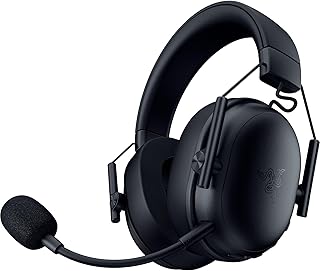


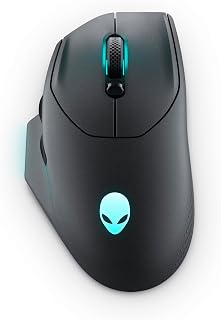


Gaming accessories can turn a basic computer or console setup into a more personalised gaming environment. The right peripherals can improve control, audio, comfort and convenience while helping you create a setup that matches your favourite games. At a2zdeal, the gaming accessories category brings together products such as gaming mice, keyboards, headsets, controllers, mouse pads, speakers and other useful gaming gear.
When choosing gaming accessories in Australia, start with the platform you use most often. PC gamers may prioritise a responsive mouse, mechanical keyboard and comfortable headset, while console players may focus on compatible controllers, headsets, charging accessories and other peripherals. Some products support several platforms, which can be useful if you switch between PC, PlayStation, Xbox, Nintendo Switch or mobile gaming.
A gaming mouse can make a noticeable difference in games that depend on accurate aiming and quick movements. Look for a sensor that suits your play style, a comfortable shape, programmable buttons and a connection method that works with your setup. Lightweight wireless mice can appeal to competitive players who want unrestricted movement, while wired models provide a simple connection without relying on battery power.
DPI is another specification worth understanding. A higher maximum DPI does not automatically make a mouse better for every player. Instead, consider sensor consistency, tracking performance, polling rate, button layout and overall comfort. MMO and strategy players may also benefit from additional programmable buttons for shortcuts and commands.
A gaming keyboard can provide responsive controls and useful customisation for both gaming and everyday computer use. Mechanical keyboards are popular because they offer different switch characteristics, while low-profile and membrane designs can provide an alternative feel. Features such as anti-ghosting, programmable keys, RGB lighting, detachable USB cables and wireless connectivity can also influence your choice.
Consider the keyboard size before buying. Full-size keyboards include a dedicated number pad, whereas tenkeyless and compact layouts leave more desk space for mouse movement. Australian shoppers should also check the keyboard layout and connection type so the product matches their computer and preferred typing setup.
A suitable gaming headset combines game audio with voice communication. Features to compare include microphone quality, speaker drivers, connection type, comfort, controls and compatibility. Wired headsets can offer straightforward plug-and-play use, while wireless models can provide greater freedom around the desk or room.
Comfort matters when gaming sessions last for several hours. Look for adjustable headbands, suitable ear-cup sizes and cushioning that feels comfortable for extended use. If you regularly play multiplayer games, a clear microphone and convenient mute control can also be valuable.
Controllers are useful for racing, sports, action, platform and other games where analogue sticks and ergonomic button layouts feel natural. Before choosing a controller, confirm compatibility with your platform and check whether it uses USB, Bluetooth or another wireless connection. Remappable buttons and additional controls can provide extra flexibility for supported games.
A gaming mouse pad provides a consistent surface for mouse movement and can complement both optical and laser sensors. Larger desk mats can accommodate a keyboard and mouse together, while compact pads suit smaller workstations. Surface texture, dimensions, thickness and edge construction are useful factors to compare.
Other desk accessories can help keep a gaming area organised. Cable management products, laptop cooling stands and desktop speakers can add convenience without requiring a complete equipment upgrade. These smaller additions can be especially useful when you are refining an existing setup rather than replacing all your peripherals.
Always check whether an accessory is designed for PC, PlayStation, Xbox, Nintendo Switch, mobile devices or multiple platforms. Compatibility can vary between models, connection types and operating systems.
Wired accessories offer a direct connection and avoid battery charging. Wireless products can reduce cable clutter and provide greater freedom of movement. For wireless devices, consider battery life, charging method and the supported connection standard.
Comfort becomes increasingly important during longer gaming sessions. Consider mouse shape, keyboard layout, headset cushioning and the size of your available desk space. An accessory that feels comfortable in everyday use can be more practical than one chosen only for its headline specifications.
Different games can benefit from different peripherals. Competitive FPS players may focus on mouse tracking, response and headset audio, while MMO players may prefer programmable controls. Racing fans may prioritise controller compatibility and comfortable long-session use.
You do not need to replace every peripheral at once. Start with the accessory that addresses your biggest limitation. A new mouse can improve control, a better headset can enhance communication and audio, and a mechanical keyboard can change the feel of everyday input. Once the essentials are covered, consider desk accessories and additional peripherals that improve organisation and convenience.
For Australian shoppers, comparing specifications, platform compatibility and practical features can help narrow down the options. Whether you are creating a first gaming setup or upgrading an established station, gaming accessories provide flexible ways to customise how you play.
Gaming accessories are peripherals and supporting products designed to enhance gaming. Common examples include gaming mice, keyboards, headsets, controllers, mouse pads, speakers and related desk accessories.
A gaming mouse and keyboard are common starting points for PC gaming. A headset can also be useful for game audio and multiplayer communication. The accessories you need depend on your games, existing equipment and personal preferences.
Wireless gaming accessories can be suitable for gaming when they provide the connection performance, battery life and compatibility you require. Check the manufacturer's specifications for the intended platform and wireless technology.
Consider sensor performance, shape, weight, DPI range, polling rate, button configuration and wired or wireless connectivity. Your preferred games and grip style can help determine which specifications matter most.
Mechanical keyboards offer individual switches with different characteristics and can provide a distinct feel and response. Whether one is suitable for you depends on your preferred switch type, noise level, layout, features and budget.
Compare compatibility, connection type, microphone performance, audio features, comfort and controls. If you play multiplayer games, pay particular attention to microphone clarity and convenient mute controls.
Some gaming accessories support multiple platforms, while others are designed for a specific system. Always check the product's compatibility information before purchasing, particularly for controllers and wireless peripherals.
Find gaming accessories designed to make your setup more responsive, comfortable and enjoyable. From precision gaming mice and mechanical keyboards to wireless headsets, controllers and large mouse pads, the right peripherals can complement PC and console gaming. Whether you are upgrading one essential item or building a complete gaming station, compare features such as connectivity, comfort, sensor performance, switch type, compatibility and battery life to find gear that suits the way you play.