

♥ Wishlist


![Wireless HDMI Transmitter and Receiver [100ft, 4K to 1080p], 2.4G/5G Dual Band HDMI Radio Transmission, Plug & Play for Streaming Video Audio File from Laptop/PC/TV Box to Monitor/TV/Projector](https://m.media-amazon.com/images/I/71G9Ywg+wAL._AC_UL320_.jpg)

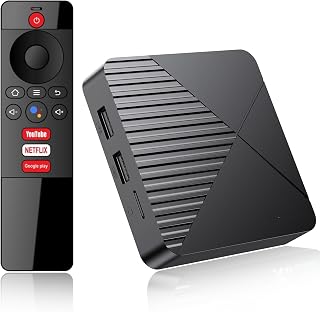


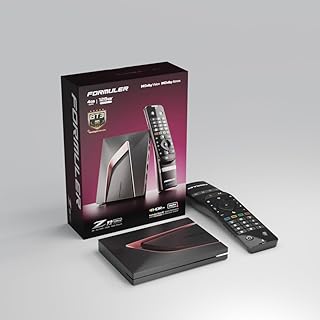


Streaming devices and set-top boxes provide a simple way to expand the entertainment capabilities of a compatible television. Instead of relying only on built-in TV software, an external device can provide a dedicated interface for streaming, media playback, casting and other connected entertainment functions. The right option depends on how you watch content and the equipment already available in your home.
Streaming sticks are compact and convenient. They typically connect directly to an HDMI port and are well suited to users who want a small device with minimal equipment around the television. Their portable design can also be useful when moving between compatible displays.
TV boxes and Android-based media players generally offer a larger enclosure and may provide additional ports, storage, wired networking or expanded connectivity. These devices can suit home entertainment setups where flexibility and external connections are important.
Media players can also be useful for playing compatible files from USB storage or other supported sources. Always check the product specifications for supported formats, operating systems, applications and connection types before purchasing.
Resolution is an important consideration when choosing a streaming device. If your television supports 4K Ultra HD, look for a device that supports the required 4K output and compatible content. Some products also advertise HDR, Dolby Vision or other picture technologies, although actual performance depends on the television, content and complete connection chain.
Devices advertised for 8K output may appeal to shoppers with compatible displays, while Full HD and 1080p models can remain suitable for older televisions or secondary screens. Matching the device's maximum supported resolution with your display helps avoid paying for features you cannot use.
A reliable network connection can make a noticeable difference to streaming performance. Many modern streaming devices support dual-band Wi-Fi, while selected TV boxes also include Ethernet ports for a wired connection. Consider the distance between your TV and router, household network conditions and whether a wired connection is practical.
Bluetooth can provide additional flexibility for compatible remotes, headphones, speakers, keyboards and other accessories. HDMI remains essential for connecting most streaming devices to a television or projector, so check the available HDMI port and required cable or adapter before ordering.
Depending on the model, streaming devices can offer voice control, dedicated remotes, app support, screen casting, media playback and access to popular entertainment services. Some products support technologies such as Google Cast, Miracast, AirPlay or DLNA, but compatibility varies between devices and operating systems.
It is important to distinguish between hardware capability and service availability. A device may support an application or streaming technology without including a subscription. Content services can also change their device compatibility, regional availability and subscription requirements, so check the latest requirements for the services you intend to use.
A compact streaming stick can work well for a bedroom television, rental property or secondary display. A more capable TV box may be better suited to a dedicated lounge-room entertainment system where additional ports, storage and networking options are useful.
Wireless HDMI transmitters and display adapters serve a different purpose. Rather than functioning solely as conventional streaming players, they can transmit or mirror video from compatible laptops, phones, cameras or other source devices to a TV, monitor or projector. This makes them useful for presentations, casual viewing and multi-device setups when supported by the hardware.
Start by checking your television's available HDMI ports, supported resolution and network options. Then consider whether you need Wi-Fi only or Ethernet, built-in storage, USB ports, Bluetooth, voice control or screen mirroring. If you plan to connect external speakers or other equipment, review the available audio and video outputs.
Also consider the operating system and application ecosystem. A device that works smoothly with your preferred services and mobile devices can make everyday use more convenient. Review the manufacturer's specifications for supported resolutions, wireless standards, ports and compatibility rather than choosing based only on a headline feature.
The streaming devices and set-top boxes category brings together a range of products for modern home entertainment, including compact TV sticks, Android boxes, 4K media players, wireless display dongles and other connected media hardware. Compare connectivity, resolution, operating system, storage and compatibility to find a device that fits your existing setup.
For Australian shoppers, checking the product specifications and intended use before purchasing can help ensure the device matches the television, network and entertainment services you plan to use. Explore the available options and compare features to build a more convenient connected viewing experience.
Upgrade your home entertainment setup with streaming devices and set-top boxes designed to bring digital content to your TV. This category covers compact streaming sticks, Android TV boxes, media players, wireless display adapters and other devices that connect compatible televisions, projectors or monitors to online and local media sources. Whether you want 4K entertainment, convenient access to streaming platforms, screen mirroring from a phone or laptop, or a flexible media player for your home cinema, choosing the right device depends on your TV, connectivity, resolution requirements and preferred features.